
Chabokran: The Android Trojan Behind a Fake Labor Ministry Employment Scheme
Chabokran, or the malicious “Kar” app, uses the promise of employment to steal SMS messages and one-time passwords.


Download the RaazNet Forensics Team’s technical report: Download PDF
It begins with an advertisement on Telegram. A user clicks a link and is taken to a page bearing the logo of Iran’s Ministry of Cooperatives, Labour and Social Welfare and designed to look official. The page claims to administer a “support scheme for creating jobs for young people.” After the user enters information including a phone number, national ID number, and date of birth, the site displays what appears to be a genuine eligibility check. It then instructs the user to install an Android application to continue.
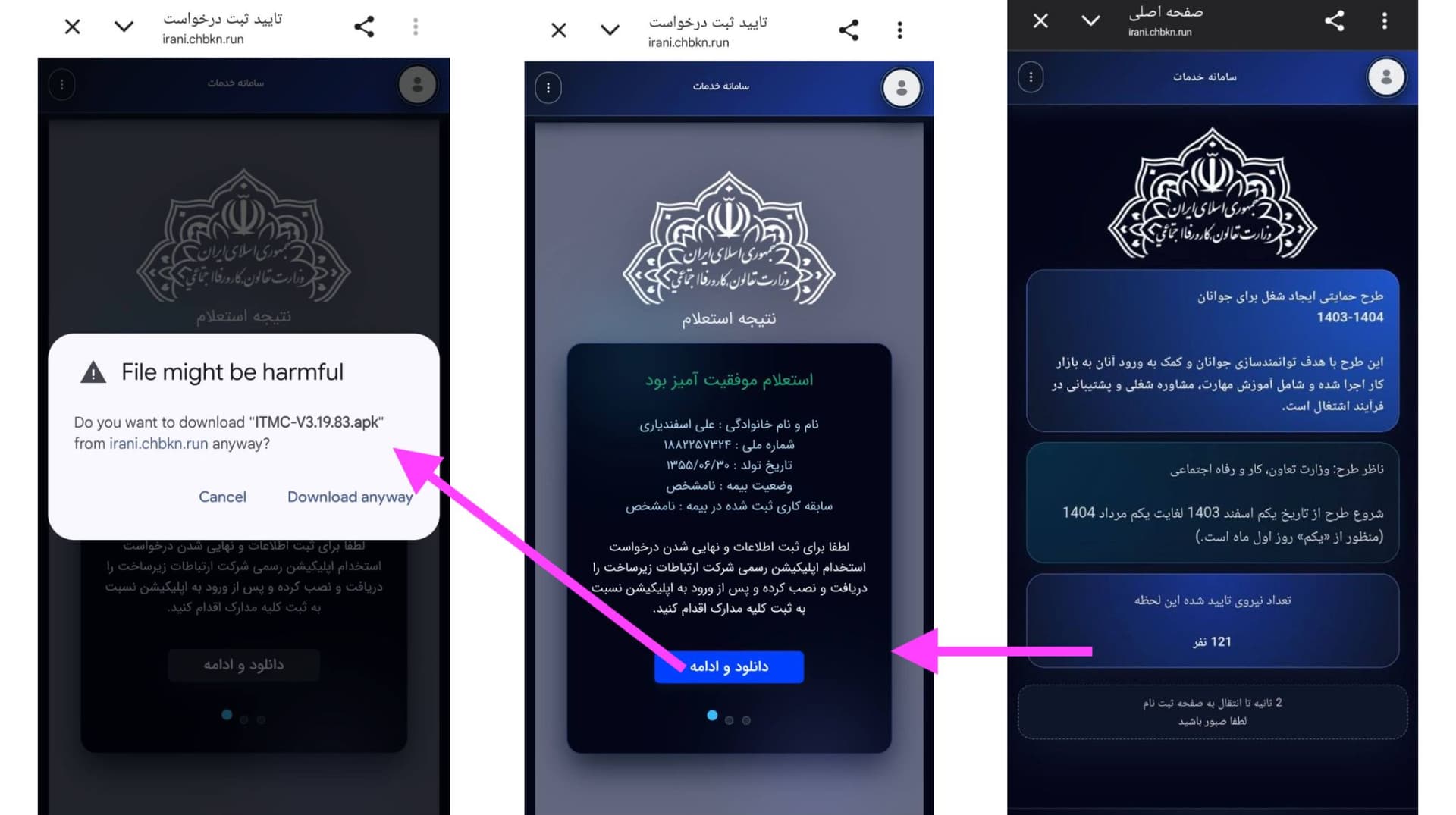
RaazNet’s technical investigation, however, shows that the file—far from belonging to an official government body—is an Android banking trojan designed to steal SMS messages and one-time passwords, obtain sensitive permissions, and maintain persistence on the device. This report brings together evidence from technical analysis of the sample, reconstruction of the deception chain, examination of related infrastructure, and verification against official and unofficial sources. It traces how a fabricated employment scheme was turned into a vehicle for malware distribution. Important questions, including the identity of those behind the operation, remain unanswered.
Key Findings
- RaazNet’s technical analysis identifies the APK, labeled “Kar” and using the package name com.chvi.pool, with high confidence as a malicious Android banking trojan.
- The malware requests permission to read, receive, and send SMS messages. By registering a high-priority SMS receiver, it is designed to intercept text messages and banking one-time passwords (OTPs).
- The application impersonates Google Chrome, using a similar name and icon to reduce the likelihood that the user will identify it as malicious.
- Analysis of the sample shows that the malware uses Firebase Cloud Messaging to receive remote messages and commands, although static analysis did not reveal its complete command-and-control (C2) infrastructure.
- The deception chain begins by misusing the name, logo, and narratives associated with the Ministry of Cooperatives, Labour and Social Welfare. RaazNet found no evidence that the domain, website, or APK used in the campaign was official.
An “Employment Scheme” That Does Not Exist
The deception chain begins with a website that uses the name, logo, and visual identity of the Ministry of Cooperatives, Labour and Social Welfare to present itself as part of an official employment program. The landing page refers to a “support scheme for creating jobs for young people” and displays labels such as “number of approved workers,” “status inquiry,” and “insurance status.” These details are intended to make users—addressed as prospective employers—believe that they are interacting with a government system. The site’s look and feel closely resembles that of the Islamic Republic’s official digital platforms.
Insert edited video here
The user is then asked to enter a phone number, national ID number, and date of birth. Once the information is submitted, the website displays a result resembling the output of an official verification system and directs the user to install an APK file to “continue the process.” The sequence is designed to resemble a legitimate registration procedure.
RaazNet’s review found that the Ministry of Cooperatives, Labour and Social Welfare—while operating various employment programs and platforms, including internship schemes, wage subsidies, insurance incentives, and a job-search system—has no standalone program or platform with the exact title “Support Scheme for Creating Jobs for Young People, 1403–1404.” More significantly, after displaying the purported eligibility result, the website tells the user to download and install an APK directly from the site, outside any official app store, in order to continue the registration.
The narrative used in this campaign has appeared in Iran’s online scam ecosystem since at least 2025. On May 10, 2025, Iran’s Cyber Police, known as FATA, warned of scams targeting users under titles similar to the “Ministry of Cooperatives, Labour and Social Welfare’s support scheme for youth employment.” The warning said cybercriminals were exploiting citizens’ need for work by publishing fake job advertisements and employment schemes in order to commit fraud or collect personal information.
How the Fake Website Builds Trust
The campaign—referred to as “Chabokran” in some Telegram advertisements—does not simply ask users to download a file from Telegram or another messaging service. Its first step is to create the experience of registering through an official government platform.
After clicking a link in a Telegram channel, group, or message, the user arrives at a page made to resemble the Ministry of Cooperatives, Labour and Social Welfare. The page asks for a mobile number, national ID number, and date of birth. Crucially, it does not accept just any national ID number: it validates the number’s structure using its check digit. For many users, this behavior may create the false impression that the system has access to Iran’s national identity databases.
After the information is submitted, the website reports that the inquiry was successful and displays details it attributes to the user, including a first and last name, national ID number, date of birth, and insurance status. The system is fraudulent: it does not actually verify the user’s name, and a fabricated name can be entered. Once it has secured the trust of users who have continued this far, the site asks them to download and install an APK file to “continue the process.”
From a social-engineering perspective, each stage is designed to make the next one appear natural. Collecting identity details, displaying a result that resembles an official record, and finally requesting the installation of an application create a sequence familiar to many users of Iranian e-government services. This familiarity increases the attack’s likelihood of success.
Dissecting the Malware
Once the APK is installed, the social-engineering phase ends and the malware begins operating on the victim’s device. To examine the file distributed in the campaign, RaazNet’s technical team conducted a static analysis of the APK without executing it in a live environment. Static analysis makes it possible to extract the application’s structure, permissions, internal components, signing certificate, executable files, and embedded configurations without running the malware on a device or allowing it to communicate with attacker-controlled infrastructure. The limitation is that some dynamic behavior—including the final destination of stolen data and commands received at runtime—cannot be observed at this stage.
Details of the analyzed file:
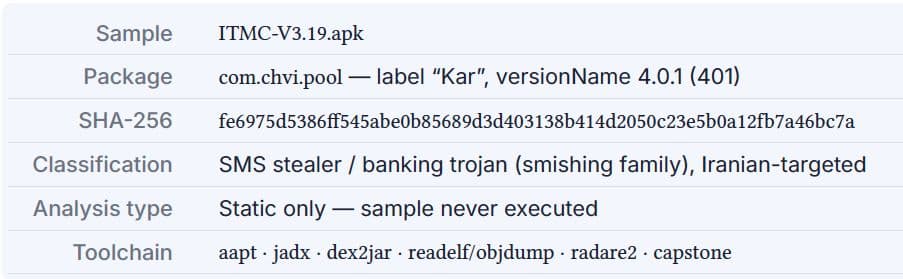
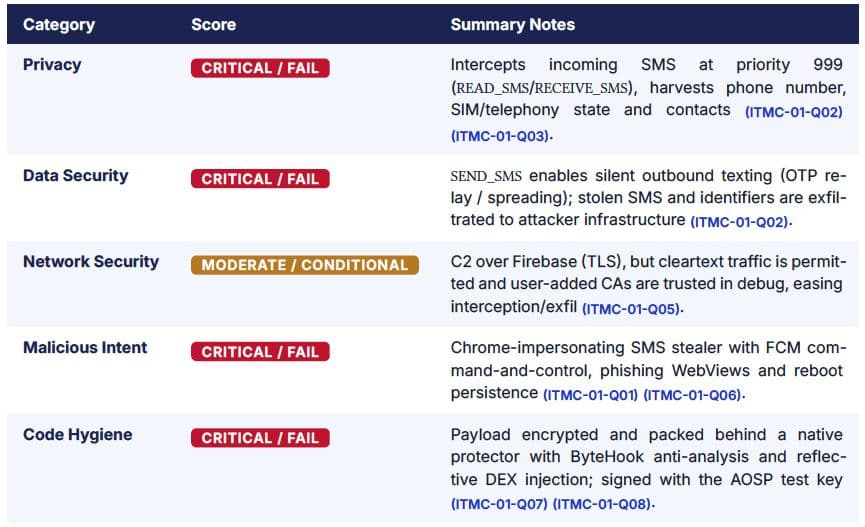
The application can be classified with high confidence as an Android banking trojan with SMS-stealing capabilities that targets Iranian users. This assessment is based on the program’s structure, requested permissions, internal components, concealment mechanisms, Firebase configuration, and other technical evidence contained in the sample—not on execution of the malware or observation of its behavior in a live environment. The observed features, including impersonation of a familiar user experience associated with the Islamic Republic’s government platforms, requests for sensitive permissions, anti-analysis protections, and an architecture designed for concealment, are consistent with established patterns in Android malware.
Impersonating Chrome to Stay Hidden
One of the first features to stand out in the APK is the application’s attempt to imitate Google Chrome. One of its primary activities is labeled as Chrome and uses a name and icon likely to remind many users of Google’s official browser.
Analysis of the application’s structure also shows that the malware can change the state of its launcher activity. This could allow the app’s icon to disappear after installation or to appear differently in the application list. Android malware commonly uses this behavior to reduce the likelihood of detection by the user.
As a result, a user may believe that the installed file is merely part of the browser or a normal Android component. In some scenarios, if the application icon is removed from the app drawer or disabled, the user may assume that the app has “disappeared” after installation or that the installation failed, even as its core services remain active in the background. This technique is part of a known set of defense-evasion methods used by Android malware to reduce the likelihood that a victim will identify and remove it.
Designed to Intercept SMS Messages and One-Time Passwords
Technical analysis of the sample shows that one of the malware’s most important capabilities is access to incoming SMS messages. Android banking trojans frequently use this access to intercept one-time passwords, authentication codes, and other sensitive messages. The combination of three sensitive Android permissions—READ_SMS, RECEIVE_SMS, and SEND_SMS—allows the application to view incoming messages, detect when they arrive, and send messages when needed. In addition, the manifest defines an SMS receiver with a priority of 999, allowing the malware to process incoming messages before many other applications.
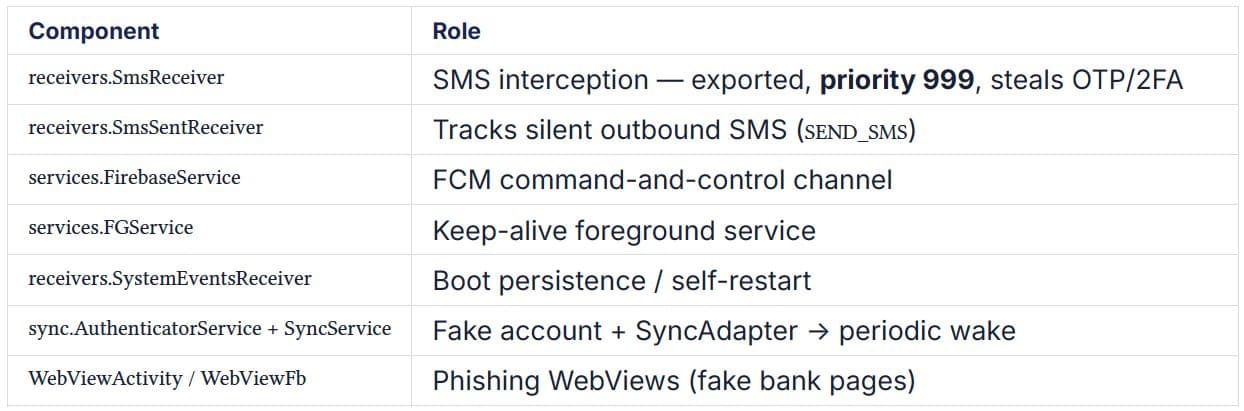
This finding is based on static analysis of the APK; the application’s runtime behavior was not observed. Nevertheless, the combination of requested permissions, the receiver’s structure, and the application’s implementation matches known patterns in Android malware designed to intercept SMS messages and authentication codes. It is among the strongest grounds for classifying this sample as a banking trojan.
Device Identification and a Phishing Framework
The application also requests permissions to access device information. These include READ_PHONE_STATE and READ_PHONE_NUMBERS, which provide access to certain information about the phone’s status and number. The presence of activities associated with contact access also indicates that the malware can collect some user information. Such data can help the malware profile a device and better tailor its operation to the victim’s environment.
The file structure also contains two Android activities named WebViewActivity and WebViewFb, indicating that the application is designed to display web pages internally. Android malware often uses this capability to present phishing pages and capture sensitive user information.
Persistence and Communication with Attacker Infrastructure
An important feature of the sample is its attempt to remain active on the device after installation. The analysis shows that the malware uses several established Android mechanisms to sustain its operation. A boot receiver allows the application to reactivate after the device restarts. The use of a foreground service, SyncAdapter, and self-restart mechanisms further indicates that the app is designed to continue running in the background; closing it or restarting the device does not necessarily stop it. These capabilities alone do not mean that all of them will function successfully on every version of Android. Their effectiveness depends on the operating system’s security policies, the Android version, and the permissions granted by the user.
The sample uses Firebase Cloud Messaging to communicate with command infrastructure. The installation file contains identifiers associated with the Firebase project vnisi-feec9, as well as sender and application IDs, showing that the app is configured to receive messages or commands through Firebase infrastructure.
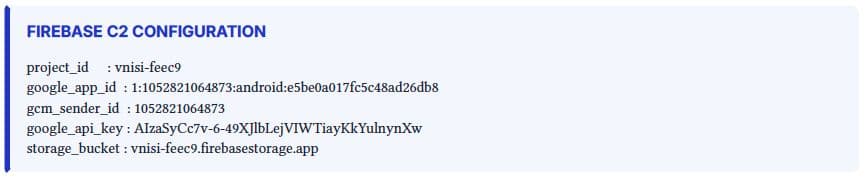
Firebase offers attackers significant operational advantages. The application’s communications pass through legitimate Google infrastructure, making its network traffic appear routine and legitimate. The service also supports messaging at scale, while blocking it entirely is difficult without disrupting legitimate applications. For these reasons, many Android malware families have used Firebase in recent years as a channel for receiving commands or notifications.
The presence of a Firebase configuration, however, must be distinguished from full visibility into the malware’s command-and-control infrastructure. At the time of publication, RaazNet can state with confidence only that Firebase is a confirmed communications channel for the malware. Its complete command, control, and data-transfer architecture remains unknown.
Operational Flow and Attack Chain
This campaign does not rely on the exploitation of an advanced technical vulnerability. It is built on social engineering and the abuse of public trust in a government institution. By moving the victim from a fake website to the installation of a malicious application, the attackers gradually expand their level of access. Ultimately, they obtain capabilities including data theft, SMS interception, persistent access to the device, and a platform for financial fraud. The table below summarizes each stage of the attack chain, from the victim’s initial interaction to post-compromise activity.
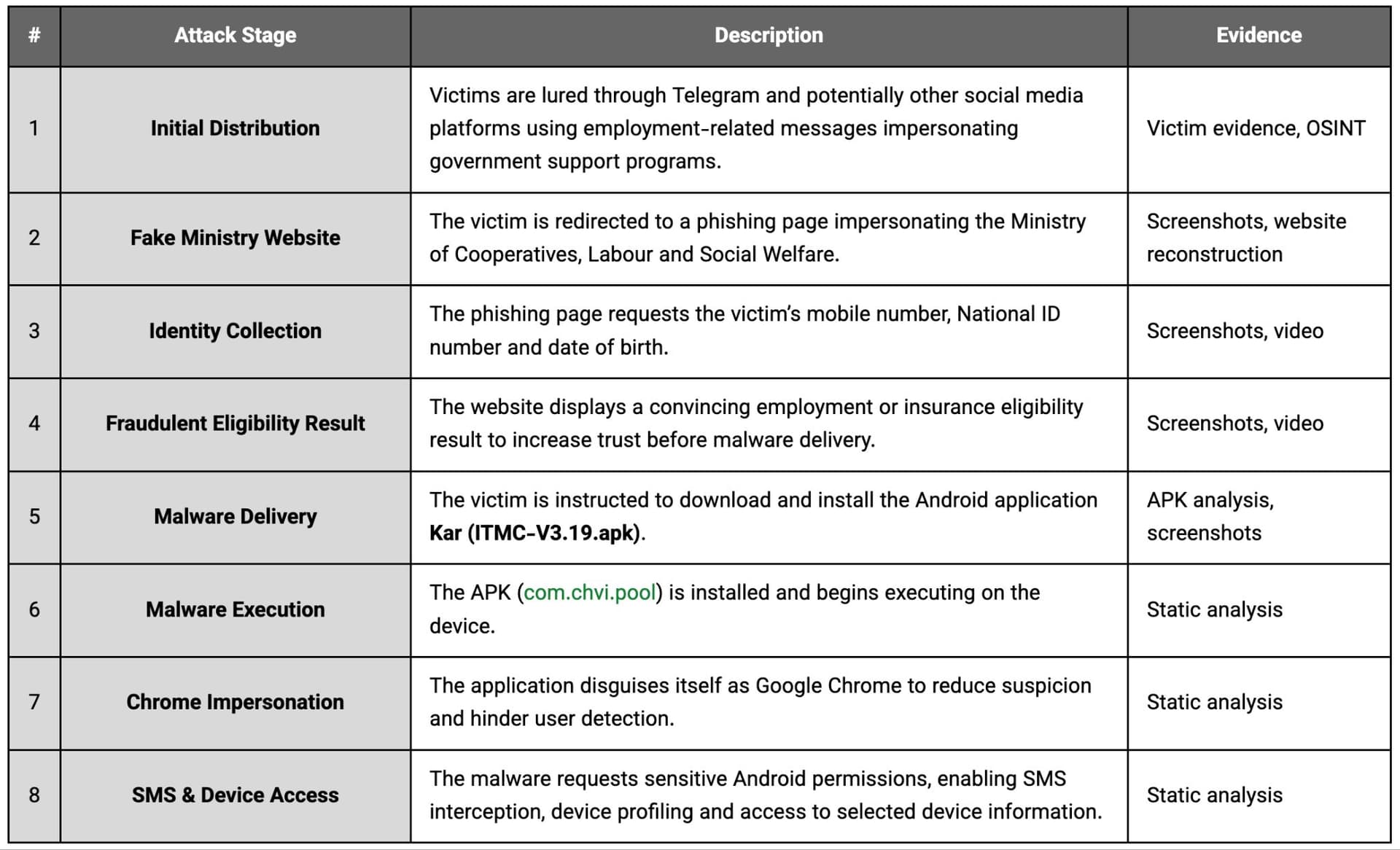
A technical reconstruction based on the available evidence shows that the operation begins with a fake Ministry of Cooperatives, Labour and Social Welfare website promoted on social media. After entering identity information, the victim is directed to download a malicious Android installation file. Once installed, the malware disguises itself as Google Chrome, obtains sensitive permissions, activates its persistence mechanisms, and uses Firebase to communicate with attacker infrastructure. The process ultimately enables ongoing monitoring of the victim’s device and the misuse of its data and capabilities.
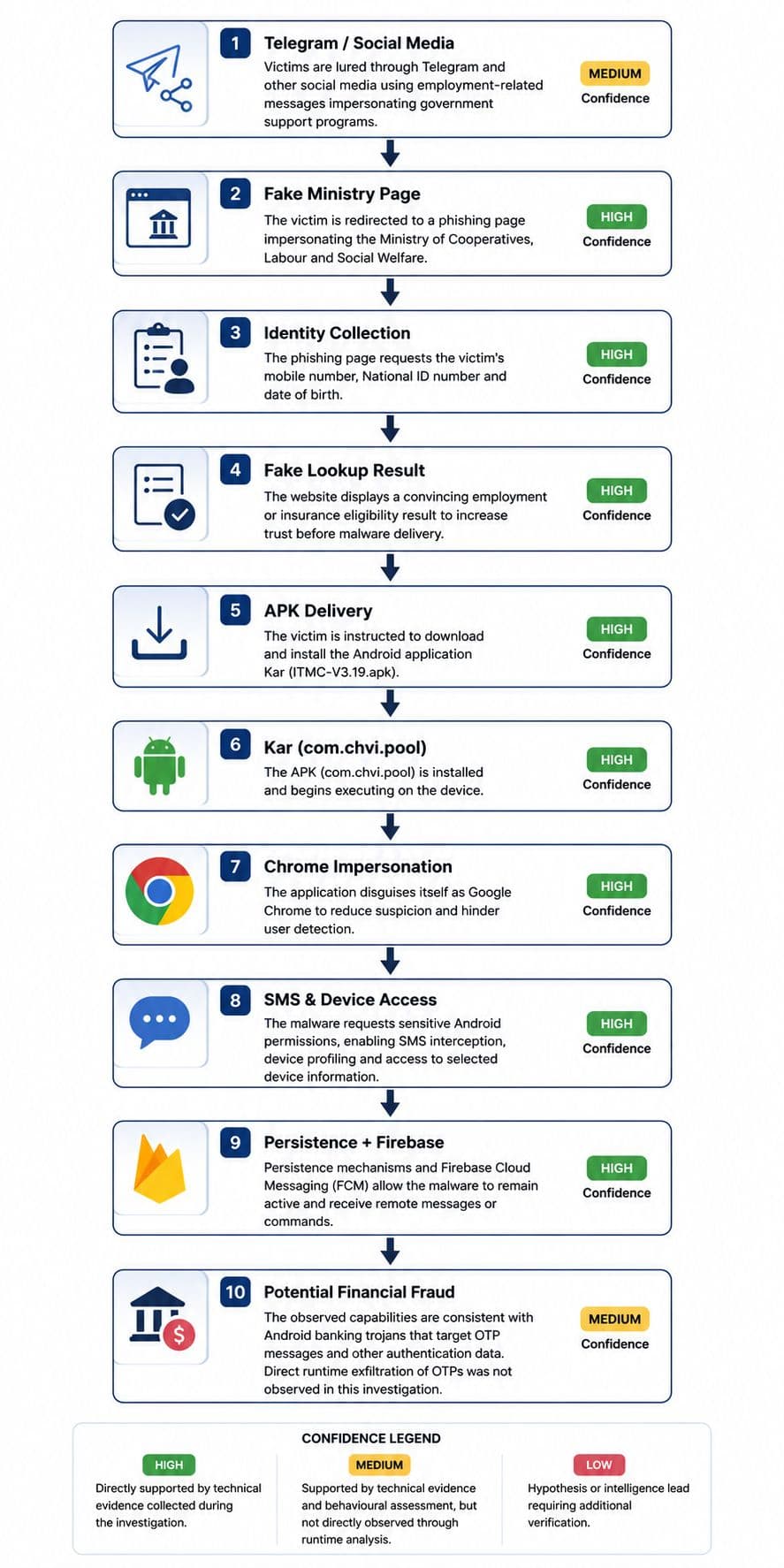
Infrastructure and Links to a Malware Family
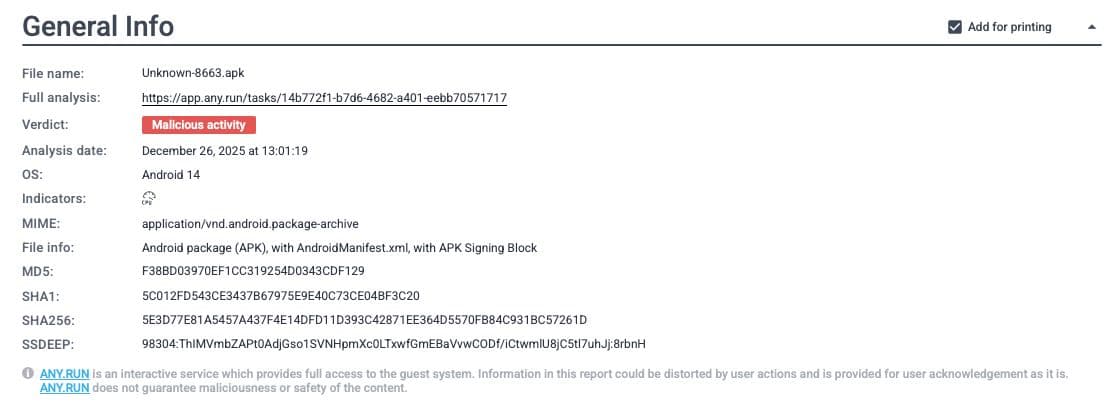
The sample is unlikely to be entirely new or standalone malware. It shares significant characteristics with a family of Android samples previously documented in public analysis services and security reporting. The package name (com.chvi.pool), Firebase project identifier (vnisi-feec9), and Google App ID have also appeared in publicly analyzed samples (ANY.RUN and Filterwatch).
The campaign specifically targets Iranian users and exploits the visual identity of the Islamic Republic’s public institutions for social engineering—particularly in light of the country’s current economic conditions. It operates as an Android banking trojan capable of intercepting SMS messages and stealing sensitive information. At the time of writing, RaazNet had found no credible technical or intelligence evidence attributing the operation to a specific criminal group, state actor, technology contractor, or entity affiliated with the Islamic Republic. On the evidence currently available, the case should be treated as a financial phishing and malware campaign that impersonates government institutions. Any attribution beyond that would require new technical or intelligence evidence.
Why a Complete Analysis of the Malware Is Difficult
An important feature of the sample is its use of multiple protection layers to hinder analysis and reverse engineering. Static analysis can reveal and reconstruct a substantial portion of the logic in many Android applications. In this sample, however, a significant part of the executable logic is stored in encrypted form and revealed in device memory only at runtime.
The malware’s developers have sought to prevent security researchers from fully understanding its functionality simply by opening the APK. To achieve this, they separated part of the application’s logic from the main APK and stored it as an encrypted payload that is loaded and decrypted in device memory only when the application runs.
The presence of assets/client.proto, the payload’s extremely high entropy score of 7.999 out of 8, the use of a native protector, and techniques including in-memory DEX loading and reflective injection indicate that the malware is designed to reveal a significant part of its logic only at runtime. This approach makes reverse engineering considerably more difficult and prevents static analysis from exposing all of the application’s capabilities.
Because this assessment is based on static analysis and the malware was not executed in a controlled environment, several operational aspects remain unobserved or unconfirmed. The most important unknowns are:
- The exact address of the command-and-control (C2) infrastructure
- The final destination of intercepted SMS messages or other stolen data
- The commands the malware can receive through Firebase Cloud Messaging
- The payload’s complete behavior after it is loaded into memory
- The final data-exfiltration path
Answering these questions would require dynamic analysis, controlled execution of the sample, and observation of its network traffic in a laboratory environment.
Immediate Steps If You Installed the Application
If you installed this application, you should assume that your device may be compromised. Given the capabilities observed in RaazNet’s analysis—including access to SMS messages and device information, as well as persistence mechanisms—simply uninstalling the application may not fully eliminate the risk. Prioritize the following steps:
- Disconnect the device from the internet and other networks to reduce the possibility of continued communication between the malware and attacker infrastructure.
- Do not use the affected device to change passwords. Use a clean, trusted device to change the passwords for your bank accounts, email, messaging services, and other important accounts.
- Review banking, messaging, and other sensitive account records for unauthorized logins or suspicious transactions.
- If you use SMS to receive one-time passwords, review your login history and multi-factor authentication settings. Where possible, switch to a more secure method, such as an authenticator app or a hardware security key.
- Do not assume that uninstalling the application is sufficient. Given the persistence mechanisms observed in this sample, if there is evidence of misuse or unauthorized access, a secure factory reset of the device is recommended.